 96b163e874
* Update build doc * Add cgraph tensor output name to OV op name * Update openvino build instructions * Add initial NPU support * draft NPU support version 2: prefill + kvcache * NPU support version 2: prefill + kvcache * Change due to ggml cgraph changes, not correct yet * Change due to ggml cgraph changes, llama-3.2 CPU work * Add AMD64 to CMakeLists * Change due to ggml cgraph changes, all device work * Refactor: clean, fix warning * Update clang-format * Statful transformation for CPU GPU * Add SwiGLU * Fuse to SDPA * Replace Concat with Broadcast in MulMat for GQA * Pull out indices creation for kv cache update * Refactor: remove past_token_len from extra_inputs * Fix Phi3 SwiGLU and SoftMax * Pull out sin cos from rope * Reduce memory: free ov weights node after graph conversion * Fix CPY due to cgraph change * Added OpenVINO CI/CD. Updated docs * Fix llama-cli * Fix Phi3 ROPE; Add test-backend-ops * Fix NPU * Fix llama-bench; Clang-format * Fix llama-perplexity * temp. changes for mark decomp * matmul in fp32 * mulmat input conversion fix * mulmat type conversion update * add mark decomp pass * Revert changes in fuse_to_sdpa * Update build.md * Fix test-backend-ops * Skip test-thread-safety; Run ctest only in ci/run.sh * Use CiD for NPU * Optimize tensor conversion, improve TTFT * Support op SET_ROWS * Fix NPU * Remove CPY * Fix test-backend-ops * Minor updates for raising PR * Perf: RMS fused to OV internal RMS op * Fix after rebasing - Layout of cache k and cache v are unified: [seq, n_head, head_size] - Add CPY and FLASH_ATTN_EXT, flash attn is not used yet - Skip test-backend-ops due to flash attn test crash - Add mutex around graph conversion to avoid test-thread-safety fali in the future - Update NPU config - Update GPU config to disable SDPA opt to make phi-3 run * Change openvino device_type to GPU; Enable flash_attn * Update supports_buft and supports_op for quantized models * Add quant weight conversion functions from genai gguf reader * Quant models run with accuracy issue * Fix accuracy: disable cpu_repack * Fix CI; Disable test-backend-ops * Fix Q4_1 * Fix test-backend-ops: Treat quantized tensors as weights * Add NPU Q4_0 support * NPU perf: eliminate zp * Dequantize q4_1 q4_k q6_k for NPU * Add custom quant type: q8_1_c, q4_0_128 * Set m_is_static=false as default in decoder * Simpilfy translation of get_rows * Fix after rebasing * Improve debug util; Eliminate nop ReshapeReshape * STYLE: make get_types_to_requant a function * Support BF16 model * Fix NPU compile * WA for npu 1st token acc issue * Apply EliminateZP only for npu * Add GeGLU * Fix Hunyuan * Support iSWA * Fix NPU accuracy * Fix ROPE accuracy when freq_scale != 1 * Minor: not add attention_size_swa for non-swa model * Minor refactor * Add Q5_K to support phi-3-q4_k_m * Requantize Q6_K (gs16) to gs32 on GPU * Fix after rebasing * Always apply Eliminate_ZP to fix GPU compile issue on some platforms * kvcachefusion support * env variable GGML_OPENVINO_DISABLE_SDPA_OPTIMIZATION added * Fix for Phi3 * Fix llama-cli (need to run with --no-warmup) * Fix add_sliced_mask; Revert mulmat, softmax; Remove input attention_size, iSWA model not working * fix after rebasing * Fix llama-3-8b and phi3-mini q4_0 NPU * Update to OV-2025.3 and CMakeLists.txt * Add OV CI cache * Apply CISC review and update CI to OV2025.3 * Update CI to run OV dep install before build * Update OV dockerfile to use OV2025.3 and update build docs * Style: use switch in supports_ops * Style: middle ptr and ref align, omit optional struct keyword * NPU Unify PD (llama/14) * Stateless. Fix llama-cli llama-server * Simplify broadcast op in attention * Replace get_output_tensor+memcpy with set_output_tensor * NPU unify PD. Unify dynamic and static dims * Clean placeholders in ggml-openvino.cpp * NPU unify PD (handled internally) * change graph to 4d, support multi sequences * Fix llama-bench * Fix NPU * Update ggml-decoder.cpp Hitting error while compiling on windows: error C3861: 'unsetenv': identifier not found Reason: unsetenv() is a POSIX function; it doesn’t exist on Windows. Visual Studio (MSVC) won’t recognize it. Proposed fix: Use _putenv_s() (Windows equivalent) This is supported by MSVC and achieves the same effect: it removes the environment variable from the process environment. This keeps cross-platform compatibility. * Update ggml-decoder.cpp * Update ggml-decoder.cpp * Update ggml-decoder.cpp * Update ggml-decoder.cpp * Update ggml-decoder.cpp * Remove the second decoder for node. Moving the function into the model decoder * Fix error for naive * NPU prefill chunking * NPU fix llama-bench * fallback naive run with accuracy issue * NPU support llma-perplexity -b 512 --no-warmup * Refactor: split ov_graph_compute for dynamic and static * remove unused API GgmlOvDecoder::get_output_stride(const std::string & name) * minor update due to ov 2025.4 * remove unused API GgmlOvDecoder::get_output_names() * remove unused API get_output_shape(const std::string & name) * Modified API GgmlOvDecoder::get_output_type(const std::string & name) * Removed API GgmlOvDecoder::get_output_op_params(const std::string & name) * Removed API get_output_ggml_tensor(const std::string & name) * Removed API m_outputs * Removed m_output_names * Removed API GgmlOvDecoder::get_input_names() * Removed API GgmlOvDecoder::get_input_stride(const std::string& name) * Removed API get_input_type * Removed API get_input_type * Removed API GgmlOvDecoder::get_input_shape(const std::string & name) * Removed API GgmlOvDecoder::get_input_op_params(const std::string & name) * Fix error for decoder cache * Reuse cached decoder * GPU remove Q6_K requantization * NPU fix wrong model output shape * NPU fix q4 perf regression * Remove unused variable nodes * Fix decoder can_reuse for llama-bench * Update build.md for Windows * backend buffer: allocate on host * Use shared_buffer for GPU NPU; Refactor * Add ov_backend_host_buffer; Use cached remote context * Put kvcache on GPU * Use ggml_aligned_malloc * only use remote tensor for kvcache * only use remote tensor for kvcache for GPU * FIX: use remote tensor from singleton * Update build.md to include OpenCL * NPU always requant to q4_0_128 * Optimize symmetric quant weight extraction: use single zp * Use Q8_0_C in token embd, lm_head, and for 5 and 6 bits quant * Update build.md * Support -ctk f32 * Initial stateful graph support * Update ggml/src/ggml-openvino/ggml-decoder.cpp Co-authored-by: Yamini Nimmagadda <yamini.nimmagadda@intel.com> * code cleanup * npu perf fix * requant to f16 for Q6 embed on NPU * Update ggml/src/ggml-openvino/ggml-decoder.cpp * Update ggml/src/ggml-openvino/ggml-openvino-extra.cpp * Create OPENVINO.md in llama.cpp backend docs * Update OPENVINO.md * Update OPENVINO.md * Update OPENVINO.md * Update build.md * Update OPENVINO.md * Update OPENVINO.md * Update OPENVINO.md * kq_mask naming fix * Syntax correction for workflows build file * Change ov backend buffer is_host to false * Fix llama-bench -p -n where p<=256 * Fix --direct-io 0 * Don't put kvcache on GPU in stateful mode * Remove hardcode names * Fix stateful shapes * Simplification for stateful and update output shape processing * Remove hardcode names * Avoid re-compilation in llama-bench * Extract zp directly instead of bias * Refactor weight tensor processing * create_weight_node accept non-ov backend buffer * remove changes in llama-graph.cpp * stateful masking fix (llama/38) Fix for stateful accuracy issues and cl_out_of_resources error in stateful GPU with larger context sizes. * Fix test-backend-ops crash glu, get_rows, scale, rms_norm, add * hardcoded name handling for rope_freqs.weight * Suppress logging and add error handling to allow test-backend-ops to complete * Fix MUL_MAT with broadcast; Add unsupported MUL_MAT FLASH_ATTN cases * Use bias instead of zp in test-backend-ops * Update OV in CI, Add OV CI Tests in GH Actions * Temp fix for multithreading bug * Update OV CI, fix review suggestions. * fix editorconfig-checker, update docs * Fix tabs to spaces for editorconfig-checker * fix editorconfig-checker * Update docs * updated model link to be GGUF model links * Remove GGML_CPU_REPACK=OFF * Skip permuted ADD and MUL * Removed static variables from utils.cpp * Removed initializing non-existing variable * Remove unused structs * Fix test-backend-ops for OV GPU * unify api calling * Update utils.cpp * When the dim is dynamic, throw an error, need to is stastic forst * Add interface compute_model_outputs(), which get the model output through computing the node use count & status in the cgraph to avoid the flag using * No need to return * Fix test-backend-ops for OV GPU LNL * Fix test-thread-safety * use the shape from infer request of output tensor create to avoid issue * fix dynamic output shape issue * fix issue for the unused node in tests * Remove unused lock * Add comment * Update openvino docs * update to OV release version 2026.0 * add ci ov-gpu self hosted runner * fix editorconfig * Fix perplexity * Rewrite the model inputs finding mechanism (llama/54) * Rewrite the model inputs finding logistic * Put stateful shape handle in get input shape * Put the iteration logistic in func * Added ggml-ci-intel-openvino-gpu and doc update * .hpp files converted to .h * fix ggml-ci-x64-intel-openvino-gpu * Fix for stateful execution bug in llama-bench * Minor updates after stateful llama-bench fix * Update ggml/src/ggml-openvino/utils.cpp Co-authored-by: Yamini Nimmagadda <yamini.nimmagadda@intel.com> * Remove multiple get_shape calls * Bring back mutex into compute * Fix VIEW op, which slice the input node * Added token_len_per_seq existence check before slicing masks and moved node retrieval inside guarded block to prevent missing-key access * Temp. fix for test requant errors * Update to OV ggml-ci to low-perf * ci : temporary disable "test-llama-archs" * ci : cache v4 -> v5, checkout v4 -> v6, fix runner tag * docs : update url * Fix OV link in docker and Update docs --------- Co-authored-by: Ravi Panchumarthy <ravi.panchumarthy@intel.com> Co-authored-by: Cavus Mustafa <mustafa.cavus@intel.com> Co-authored-by: Arshath <arshath.ramzan@intel.com> Co-authored-by: XuejunZhai <Xuejun.Zhai@intel.com> Co-authored-by: Yamini Nimmagadda <yamini.nimmagadda@intel.com> Co-authored-by: Xuejun Zhai <Xuejun.Zhai@intel> Co-authored-by: Georgi Gerganov <ggerganov@gmail.com> |
||
|---|---|---|
| .devops | ||
| .github/workflows | ||
| bindings | ||
| ci | ||
| cmake | ||
| examples | ||
| ggml | ||
| grammars | ||
| include | ||
| models | ||
| samples | ||
| scripts | ||
| src | ||
| tests | ||
| .dockerignore | ||
| .gitignore | ||
| AUTHORS | ||
| build-xcframework.sh | ||
| close-issue.yml | ||
| CMakeLists.txt | ||
| LICENSE | ||
| Makefile | ||
| README_sycl.md | ||
| README.md | ||
whisper.cpp


High-performance inference of OpenAI's Whisper automatic speech recognition (ASR) model:
- Plain C/C++ implementation without dependencies
- Apple Silicon first-class citizen - optimized via ARM NEON, Accelerate framework, Metal and Core ML
- AVX intrinsics support for x86 architectures
- VSX intrinsics support for POWER architectures
- Mixed F16 / F32 precision
- Integer quantization support
- Zero memory allocations at runtime
- Vulkan support
- Support for CPU-only inference
- Efficient GPU support for NVIDIA
- OpenVINO Support
- Ascend NPU Support
- Moore Threads GPU Support
- C-style API
- Voice Activity Detection (VAD)
Supported platforms:
- Mac OS (Intel and Arm)
- iOS
- Android
- Java
- Linux / FreeBSD
- WebAssembly
- Windows (MSVC and MinGW)
- Raspberry Pi
- Docker
The entire high-level implementation of the model is contained in whisper.h and whisper.cpp.
The rest of the code is part of the ggml machine learning library.
Having such a lightweight implementation of the model allows to easily integrate it in different platforms and applications. As an example, here is a video of running the model on an iPhone 13 device - fully offline, on-device: whisper.objc
https://user-images.githubusercontent.com/1991296/197385372-962a6dea-bca1-4d50-bf96-1d8c27b98c81.mp4
You can also easily make your own offline voice assistant application: command
https://user-images.githubusercontent.com/1991296/204038393-2f846eae-c255-4099-a76d-5735c25c49da.mp4
On Apple Silicon, the inference runs fully on the GPU via Metal:
https://github.com/ggml-org/whisper.cpp/assets/1991296/c82e8f86-60dc-49f2-b048-d2fdbd6b5225
Quick start
First clone the repository:
git clone https://github.com/ggml-org/whisper.cpp.git
Navigate into the directory:
cd whisper.cpp
Then, download one of the Whisper models converted in ggml format. For example:
sh ./models/download-ggml-model.sh base.en
Now build the whisper-cli example and transcribe an audio file like this:
# build the project
cmake -B build
cmake --build build -j --config Release

# transcribe an audio file
./build/bin/whisper-cli -f samples/jfk.wav
For a quick demo, simply run make base.en.
The command downloads the base.en model converted to custom ggml format and runs the inference on all .wav samples in the folder samples.
For detailed usage instructions, run: ./build/bin/whisper-cli -h
Note that the whisper-cli example currently runs only with 16-bit WAV files, so make sure to convert your input before running the tool.
For example, you can use ffmpeg like this:
ffmpeg -i input.mp3 -ar 16000 -ac 1 -c:a pcm_s16le output.wav
More audio samples
If you want some extra audio samples to play with, simply run:
make -j samples
This will download a few more audio files from Wikipedia and convert them to 16-bit WAV format via ffmpeg.
You can download and run the other models as follows:
make -j tiny.en
make -j tiny
make -j base.en
make -j base
make -j small.en
make -j small
make -j medium.en
make -j medium
make -j large-v1
make -j large-v2
make -j large-v3
make -j large-v3-turbo
Memory usage
| Model | Disk | Mem |
|---|---|---|
| tiny | 75 MiB | ~273 MB |
| base | 142 MiB | ~388 MB |
| small | 466 MiB | ~852 MB |
| medium | 1.5 GiB | ~2.1 GB |
| large | 2.9 GiB | ~3.9 GB |
POWER VSX Intrinsics
whisper.cpp supports POWER architectures and includes code which
significantly speeds operation on Linux running on POWER9/10, making it
capable of faster-than-realtime transcription on underclocked Raptor
Talos II. Ensure you have a BLAS package installed, and replace the
standard cmake setup with:
# build with GGML_BLAS defined
cmake -B build -DGGML_BLAS=1
cmake --build build -j --config Release
./build/bin/whisper-cli [ .. etc .. ]
Quantization
whisper.cpp supports integer quantization of the Whisper ggml models.
Quantized models require less memory and disk space and depending on the hardware can be processed more efficiently.
Here are the steps for creating and using a quantized model:
# quantize a model with Q5_0 method
cmake -B build
cmake --build build -j --config Release
./build/bin/quantize models/ggml-base.en.bin models/ggml-base.en-q5_0.bin q5_0

# run the examples as usual, specifying the quantized model file
./build/bin/whisper-cli -m models/ggml-base.en-q5_0.bin ./samples/gb0.wav
Core ML support
On Apple Silicon devices, the Encoder inference can be executed on the Apple Neural Engine (ANE) via Core ML. This can result in significant
speed-up - more than x3 faster compared with CPU-only execution. Here are the instructions for generating a Core ML model and using it with whisper.cpp:
-
Install Python dependencies needed for the creation of the Core ML model:
pip install ane_transformers pip install openai-whisper pip install coremltools- To ensure
coremltoolsoperates correctly, please confirm that Xcode is installed and executexcode-select --installto install the command-line tools. - Python 3.11 is recommended.
- MacOS Sonoma (version 14) or newer is recommended, as older versions of MacOS might experience issues with transcription hallucination.
- [OPTIONAL] It is recommended to utilize a Python version management system, such as Miniconda for this step:
- To create an environment, use:
conda create -n py311-whisper python=3.11 -y - To activate the environment, use:
conda activate py311-whisper
- To create an environment, use:
- To ensure
-
Generate a Core ML model. For example, to generate a
base.enmodel, use:./models/generate-coreml-model.sh base.enThis will generate the folder
models/ggml-base.en-encoder.mlmodelc -
Build
whisper.cppwith Core ML support:# using CMake cmake -B build -DWHISPER_COREML=1 cmake --build build -j --config Release -
Run the examples as usual. For example:
$ ./build/bin/whisper-cli -m models/ggml-base.en.bin -f samples/jfk.wav

...

whisper_init_state: loading Core ML model from 'models/ggml-base.en-encoder.mlmodelc'
whisper_init_state: first run on a device may take a while ...
whisper_init_state: Core ML model loaded

system_info: n_threads = 4 / 10 | AVX = 0 | AVX2 = 0 | AVX512 = 0 | FMA = 0 | NEON = 1 | ARM_FMA = 1 | F16C = 0 | FP16_VA = 1 | WASM_SIMD = 0 | BLAS = 1 | SSE3 = 0 | VSX = 0 | COREML = 1 |

...
The first run on a device is slow, since the ANE service compiles the Core ML model to some device-specific format. Next runs are faster.
For more information about the Core ML implementation please refer to PR #566.
OpenVINO support
On platforms that support OpenVINO, the Encoder inference can be executed on OpenVINO-supported devices including x86 CPUs and Intel GPUs (integrated & discrete).
This can result in significant speedup in encoder performance. Here are the instructions for generating the OpenVINO model and using it with whisper.cpp:
-
First, setup python virtual env. and install python dependencies. Python 3.10 is recommended.
Windows:
cd models
python -m venv openvino_conv_env
openvino_conv_env\Scripts\activate
python -m pip install --upgrade pip
pip install -r requirements-openvino.txt
Linux and macOS:
cd models python3 -m venv openvino_conv_env source openvino_conv_env/bin/activate python -m pip install --upgrade pip pip install -r requirements-openvino.txt -
Generate an OpenVINO encoder model. For example, to generate a
base.enmodel, use:python convert-whisper-to-openvino.py --model base.enThis will produce ggml-base.en-encoder-openvino.xml/.bin IR model files. It's recommended to relocate these to the same folder as
ggmlmodels, as that is the default location that the OpenVINO extension will search at runtime. -
Build
whisper.cppwith OpenVINO support:Download OpenVINO package from release page. The recommended version to use is 2024.6.0. Ready to use Binaries of the required libraries can be found in the OpenVino Archives
After downloading & extracting package onto your development system, set up required environment by sourcing setupvars script. For example:
Linux:
source /path/to/l_openvino_toolkit_ubuntu22_2023.0.0.10926.b4452d56304_x86_64/setupvars.shWindows (cmd):
C:\Path\To\w_openvino_toolkit_windows_2023.0.0.10926.b4452d56304_x86_64\setupvars.batAnd then build the project using cmake:
cmake -B build -DWHISPER_OPENVINO=1 cmake --build build -j --config Release -
Run the examples as usual. For example:
$ ./build/bin/whisper-cli -m models/ggml-base.en.bin -f samples/jfk.wav

...

whisper_ctx_init_openvino_encoder: loading OpenVINO model from 'models/ggml-base.en-encoder-openvino.xml'
whisper_ctx_init_openvino_encoder: first run on a device may take a while ...
whisper_openvino_init: path_model = models/ggml-base.en-encoder-openvino.xml, device = GPU, cache_dir = models/ggml-base.en-encoder-openvino-cache
whisper_ctx_init_openvino_encoder: OpenVINO model loaded

system_info: n_threads = 4 / 8 | AVX = 1 | AVX2 = 1 | AVX512 = 0 | FMA = 1 | NEON = 0 | ARM_FMA = 0 | F16C = 1 | FP16_VA = 0 | WASM_SIMD = 0 | BLAS = 0 | SSE3 = 1 | VSX = 0 | COREML = 0 | OPENVINO = 1 |

...
The first time run on an OpenVINO device is slow, since the OpenVINO framework will compile the IR (Intermediate Representation) model to a device-specific 'blob'. This device-specific blob will get cached for the next run.
For more information about the OpenVINO implementation please refer to PR #1037.
NVIDIA GPU support
With NVIDIA cards the processing of the models is done efficiently on the GPU via cuBLAS and custom CUDA kernels.
First, make sure you have installed cuda: https://developer.nvidia.com/cuda-downloads
Now build whisper.cpp with CUDA support:
cmake -B build -DGGML_CUDA=1
cmake --build build -j --config Release
or for newer NVIDIA GPU's (RTX 5000 series):
cmake -B build -DGGML_CUDA=1 -DCMAKE_CUDA_ARCHITECTURES="86"
cmake --build build -j --config Release
Vulkan GPU support
Cross-vendor solution which allows you to accelerate workload on your GPU. First, make sure your graphics card driver provides support for Vulkan API.
Now build whisper.cpp with Vulkan support:
cmake -B build -DGGML_VULKAN=1
cmake --build build -j --config Release
BLAS CPU support via OpenBLAS
Encoder processing can be accelerated on the CPU via OpenBLAS.
First, make sure you have installed openblas: https://www.openblas.net/
Now build whisper.cpp with OpenBLAS support:
cmake -B build -DGGML_BLAS=1
cmake --build build -j --config Release
Ascend NPU support
Ascend NPU provides inference acceleration via CANN and AI cores.
First, check if your Ascend NPU device is supported:
Verified devices
| Ascend NPU | Status |
|---|---|
| Atlas 300T A2 | Support |
| Atlas 300I Duo | Support |
Then, make sure you have installed CANN toolkit . The lasted version of CANN is recommanded.
Now build whisper.cpp with CANN support:
cmake -B build -DGGML_CANN=1
cmake --build build -j --config Release
Run the inference examples as usual, for example:
./build/bin/whisper-cli -f samples/jfk.wav -m models/ggml-base.en.bin -t 8
Notes:
- If you have trouble with Ascend NPU device, please create a issue with [CANN] prefix/tag.
- If you run successfully with your Ascend NPU device, please help update the table
Verified devices.
Moore Threads GPU support
With Moore Threads cards the processing of the models is done efficiently on the GPU via muBLAS and custom MUSA kernels.
First, make sure you have installed MUSA SDK rc4.2.0: https://developer.mthreads.com/sdk/download/musa?equipment=&os=&driverVersion=&version=4.2.0
Now build whisper.cpp with MUSA support:
cmake -B build -DGGML_MUSA=1
cmake --build build -j --config Release
or specify the architecture for your Moore Threads GPU. For example, if you have a MTT S80 GPU, you can specify the architecture as follows:
cmake -B build -DGGML_MUSA=1 -DMUSA_ARCHITECTURES="21"
cmake --build build -j --config Release
FFmpeg support (Linux only)
If you want to support more audio formats (such as Opus and AAC), you can turn on the WHISPER_FFMPEG build flag to enable FFmpeg integration.
First, you need to install required libraries:
# Debian/Ubuntu
sudo apt install libavcodec-dev libavformat-dev libavutil-dev

# RHEL/Fedora
sudo dnf install libavcodec-free-devel libavformat-free-devel libavutil-free-devel
Then you can build the project as follows:
cmake -B build -D WHISPER_FFMPEG=yes
cmake --build build
Run the following example to confirm it's working:
# Convert an audio file to Opus format
ffmpeg -i samples/jfk.wav jfk.opus

# Transcribe the audio file
./build/bin/whisper-cli --model models/ggml-base.en.bin --file jfk.opus
Docker
Prerequisites
- Docker must be installed and running on your system.
- Create a folder to store big models & intermediate files (ex. /whisper/models)
Images
We have multiple Docker images available for this project:
ghcr.io/ggml-org/whisper.cpp:main: This image includes the main executable file as well ascurlandffmpeg. (platforms:linux/amd64,linux/arm64)ghcr.io/ggml-org/whisper.cpp:main-cuda: Same asmainbut compiled with CUDA support. (platforms:linux/amd64)ghcr.io/ggml-org/whisper.cpp:main-musa: Same asmainbut compiled with MUSA support. (platforms:linux/amd64)ghcr.io/ggml-org/whisper.cpp:main-vulkan: Same asmainbut compiled with Vulkan support. (platforms:linux/amd64)
Usage
# download model and persist it in a local folder
docker run -it --rm \
  -v path/to/models:/models \
  whisper.cpp:main "./models/download-ggml-model.sh base /models"

# transcribe an audio file
docker run -it --rm \
  -v path/to/models:/models \
  -v path/to/audios:/audios \
  whisper.cpp:main "whisper-cli -m /models/ggml-base.bin -f /audios/jfk.wav"

# transcribe an audio file in samples folder
docker run -it --rm \
  -v path/to/models:/models \
  whisper.cpp:main "whisper-cli -m /models/ggml-base.bin -f ./samples/jfk.wav"

# run the web server
docker run -it --rm -p "8080:8080" \
  -v path/to/models:/models \
  whisper.cpp:main "whisper-server --host 127.0.0.1 -m /models/ggml-base.bin"

# run the bench too on the small.en model using 4 threads
docker run -it --rm \
  -v path/to/models:/models \
  whisper.cpp:main "whisper-bench -m /models/ggml-small.en.bin -t 4"
Installing with Conan
You can install pre-built binaries for whisper.cpp or build it from source using Conan. Use the following command:
conan install --requires="whisper-cpp/[*]" --build=missing
For detailed instructions on how to use Conan, please refer to the Conan documentation.
Limitations
- Inference only
Real-time audio input example
This is a naive example of performing real-time inference on audio from your microphone. The stream tool samples the audio every half a second and runs the transcription continuously. More info is available in issue #10. You will need to have sdl2 installed for it to work properly.
cmake -B build -DWHISPER_SDL2=ON
cmake --build build -j --config Release
./build/bin/whisper-stream -m ./models/ggml-base.en.bin -t 8 --step 500 --length 5000
https://user-images.githubusercontent.com/1991296/194935793-76afede7-cfa8-48d8-a80f-28ba83be7d09.mp4
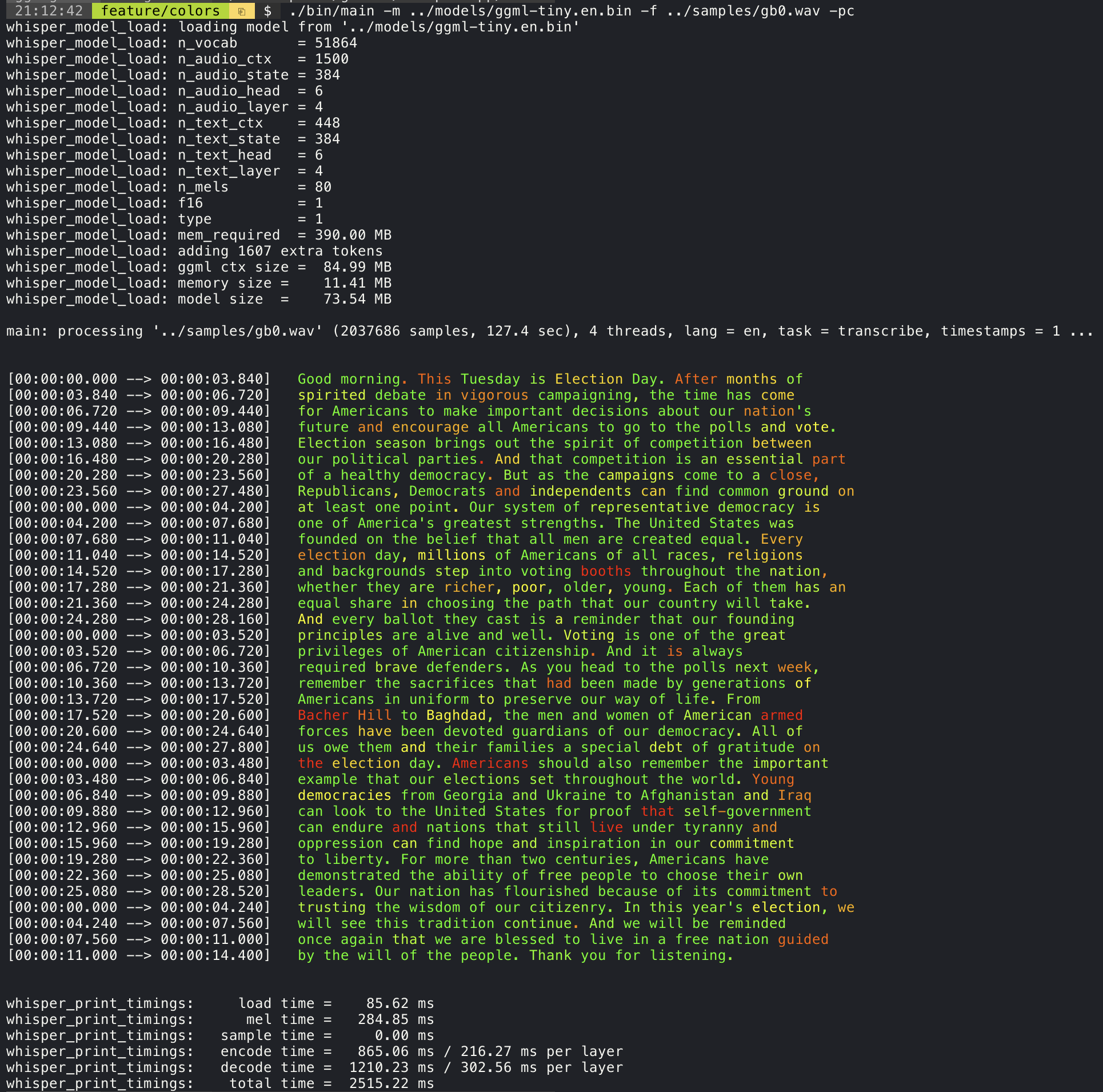
Confidence color-coding
Adding the --print-colors argument will print the transcribed text using an experimental color coding strategy
to highlight words with high or low confidence:
./build/bin/whisper-cli -m models/ggml-base.en.bin -f samples/gb0.wav --print-colors
Controlling the length of the generated text segments (experimental)
For example, to limit the line length to a maximum of 16 characters, simply add -ml 16:
$ ./build/bin/whisper-cli -m ./models/ggml-base.en.bin -f ./samples/jfk.wav -ml 16

whisper_model_load: loading model from './models/ggml-base.en.bin'
...
system_info: n_threads = 4 / 10 | AVX2 = 0 | AVX512 = 0 | NEON = 1 | FP16_VA = 1 | WASM_SIMD = 0 | BLAS = 1 |

main: processing './samples/jfk.wav' (176000 samples, 11.0 sec), 4 threads, 1 processors, lang = en, task = transcribe, timestamps = 1 ...

[00:00:00.000 --> 00:00:00.850]   And so my
[00:00:00.850 --> 00:00:01.590]   fellow
[00:00:01.590 --> 00:00:04.140]   Americans, ask
[00:00:04.140 --> 00:00:05.660]   not what your
[00:00:05.660 --> 00:00:06.840]   country can do
[00:00:06.840 --> 00:00:08.430]   for you, ask
[00:00:08.430 --> 00:00:09.440]   what you can do
[00:00:09.440 --> 00:00:10.020]   for your
[00:00:10.020 --> 00:00:11.000]   country.
Word-level timestamp (experimental)
The --max-len argument can be used to obtain word-level timestamps. Simply use -ml 1:
$ ./build/bin/whisper-cli -m ./models/ggml-base.en.bin -f ./samples/jfk.wav -ml 1

whisper_model_load: loading model from './models/ggml-base.en.bin'
...
system_info: n_threads = 4 / 10 | AVX2 = 0 | AVX512 = 0 | NEON = 1 | FP16_VA = 1 | WASM_SIMD = 0 | BLAS = 1 |

main: processing './samples/jfk.wav' (176000 samples, 11.0 sec), 4 threads, 1 processors, lang = en, task = transcribe, timestamps = 1 ...

[00:00:00.000 --> 00:00:00.320]
[00:00:00.320 --> 00:00:00.370]   And
[00:00:00.370 --> 00:00:00.690]   so
[00:00:00.690 --> 00:00:00.850]   my
[00:00:00.850 --> 00:00:01.590]   fellow
[00:00:01.590 --> 00:00:02.850]   Americans
[00:00:02.850 --> 00:00:03.300]  ,
[00:00:03.300 --> 00:00:04.140]   ask
[00:00:04.140 --> 00:00:04.990]   not
[00:00:04.990 --> 00:00:05.410]   what
[00:00:05.410 --> 00:00:05.660]   your
[00:00:05.660 --> 00:00:06.260]   country
[00:00:06.260 --> 00:00:06.600]   can
[00:00:06.600 --> 00:00:06.840]   do
[00:00:06.840 --> 00:00:07.010]   for
[00:00:07.010 --> 00:00:08.170]   you
[00:00:08.170 --> 00:00:08.190]  ,
[00:00:08.190 --> 00:00:08.430]   ask
[00:00:08.430 --> 00:00:08.910]   what
[00:00:08.910 --> 00:00:09.040]   you
[00:00:09.040 --> 00:00:09.320]   can
[00:00:09.320 --> 00:00:09.440]   do
[00:00:09.440 --> 00:00:09.760]   for
[00:00:09.760 --> 00:00:10.020]   your
[00:00:10.020 --> 00:00:10.510]   country
[00:00:10.510 --> 00:00:11.000]  .
Speaker segmentation via tinydiarize (experimental)
More information about this approach is available here: https://github.com/ggml-org/whisper.cpp/pull/1058
Sample usage:
# download a tinydiarize compatible model
./models/download-ggml-model.sh small.en-tdrz

# run as usual, adding the "-tdrz" command-line argument
./build/bin/whisper-cli -f ./samples/a13.wav -m ./models/ggml-small.en-tdrz.bin -tdrz
...
main: processing './samples/a13.wav' (480000 samples, 30.0 sec), 4 threads, 1 processors, lang = en, task = transcribe, tdrz = 1, timestamps = 1 ...
...
[00:00:00.000 --> 00:00:03.800]   Okay Houston, we've had a problem here. [SPEAKER_TURN]
[00:00:03.800 --> 00:00:06.200]   This is Houston. Say again please. [SPEAKER_TURN]
[00:00:06.200 --> 00:00:08.260]   Uh Houston we've had a problem.
[00:00:08.260 --> 00:00:11.320]   We've had a main beam up on a volt. [SPEAKER_TURN]
[00:00:11.320 --> 00:00:13.820]   Roger main beam interval. [SPEAKER_TURN]
[00:00:13.820 --> 00:00:15.100]   Uh uh [SPEAKER_TURN]
[00:00:15.100 --> 00:00:18.020]   So okay stand, by thirteen we're looking at it. [SPEAKER_TURN]
[00:00:18.020 --> 00:00:25.740]   Okay uh right now uh Houston the uh voltage is uh is looking good um.
[00:00:27.620 --> 00:00:29.940]   And we had a a pretty large bank or so.
Karaoke-style movie generation (experimental)
The whisper-cli example provides support for output of karaoke-style movies, where the
currently pronounced word is highlighted. Use the -owts argument and run the generated bash script.
This requires to have ffmpeg installed.
Here are a few "typical" examples:
./build/bin/whisper-cli -m ./models/ggml-base.en.bin -f ./samples/jfk.wav -owts
source ./samples/jfk.wav.wts
ffplay ./samples/jfk.wav.mp4
https://user-images.githubusercontent.com/1991296/199337465-dbee4b5e-9aeb-48a3-b1c6-323ac4db5b2c.mp4
./build/bin/whisper-cli -m ./models/ggml-base.en.bin -f ./samples/mm0.wav -owts
source ./samples/mm0.wav.wts
ffplay ./samples/mm0.wav.mp4
https://user-images.githubusercontent.com/1991296/199337504-cc8fd233-0cb7-4920-95f9-4227de3570aa.mp4
./build/bin/whisper-cli -m ./models/ggml-base.en.bin -f ./samples/gb0.wav -owts
source ./samples/gb0.wav.wts
ffplay ./samples/gb0.wav.mp4
https://user-images.githubusercontent.com/1991296/199337538-b7b0c7a3-2753-4a88-a0cd-f28a317987ba.mp4
Video comparison of different models
Use the scripts/bench-wts.sh script to generate a video in the following format:
./scripts/bench-wts.sh samples/jfk.wav
ffplay ./samples/jfk.wav.all.mp4
https://user-images.githubusercontent.com/1991296/223206245-2d36d903-cf8e-4f09-8c3b-eb9f9c39d6fc.mp4
Benchmarks
In order to have an objective comparison of the performance of the inference across different system configurations, use the whisper-bench tool. The tool simply runs the Encoder part of the model and prints how much time it took to execute it. The results are summarized in the following Github issue:
Additionally a script to run whisper.cpp with different models and audio files is provided bench.py.
You can run it with the following command, by default it will run against any standard model in the models folder.
python3 scripts/bench.py -f samples/jfk.wav -t 2,4,8 -p 1,2
It is written in python with the intention of being easy to modify and extend for your benchmarking use case.
It outputs a csv file with the results of the benchmarking.
ggml format
The original models are converted to a custom binary format. This allows to pack everything needed into a single file:
- model parameters
- mel filters
- vocabulary
- weights
You can download the converted models using the models/download-ggml-model.sh script or manually from here:
For more details, see the conversion script models/convert-pt-to-ggml.py or models/README.md.
Bindings
- Rust: tazz4843/whisper-rs | #310
- JavaScript: bindings/javascript | #309
- React Native (iOS / Android): whisper.rn
- Go: bindings/go | #312
- Java:
- Ruby: bindings/ruby | #507
- Objective-C / Swift: ggml-org/whisper.spm | #313
- .NET: | #422
- Python: | #9
- stlukey/whispercpp.py (Cython)
- AIWintermuteAI/whispercpp (Updated fork of aarnphm/whispercpp)
- aarnphm/whispercpp (Pybind11)
- abdeladim-s/pywhispercpp (Pybind11)
- R: bnosac/audio.whisper
- Unity: macoron/whisper.unity
XCFramework
The XCFramework is a precompiled version of the library for iOS, visionOS, tvOS, and macOS. It can be used in Swift projects without the need to compile the library from source. For example, the v1.7.5 version of the XCFramework can be used as follows:
// swift-tools-version: 5.10
// The swift-tools-version declares the minimum version of Swift required to build this package.

import PackageDescription

let package = Package(
    name: "Whisper",
    targets: [
        .executableTarget(
            name: "Whisper",
            dependencies: [
                "WhisperFramework"
            ]),
        .binaryTarget(
            name: "WhisperFramework",
            url: "https://github.com/ggml-org/whisper.cpp/releases/download/v1.7.5/whisper-v1.7.5-xcframework.zip",
            checksum: "c7faeb328620d6012e130f3d705c51a6ea6c995605f2df50f6e1ad68c59c6c4a"
        )
    ]
)
Voice Activity Detection (VAD)
Support for Voice Activity Detection (VAD) can be enabled using the --vad
argument to whisper-cli. In addition to this option a VAD model is also
required.
The way this works is that first the audio samples are passed through the VAD model which will detect speech segments. Using this information, only the speech segments that are detected are extracted from the original audio input and passed to whisper for processing. This reduces the amount of audio data that needs to be processed by whisper and can significantly speed up the transcription process.
The following VAD models are currently supported:
Silero-VAD
Silero-vad is a lightweight VAD model written in Python that is fast and accurate.
Models can be downloaded by running the following command on Linux or MacOS:
$ ./models/download-vad-model.sh silero-v6.2.0
Downloading ggml model silero-v6.2.0 from 'https://huggingface.co/ggml-org/whisper-vad' ...
ggml-silero-v6.2.0.bin        100%[==============================================>] 864.35K  --.-KB/s    in 0.04s
Done! Model 'silero-v6.2.0' saved in '/path/models/ggml-silero-v6.2.0.bin'
You can now use it like this:

  $ ./build/bin/whisper-cli -vm /path/models/ggml-silero-v6.2.0.bin --vad -f samples/jfk.wav -m models/ggml-base.en.bin
And the following command on Windows:
> .\models\download-vad-model.cmd silero-v6.2.0
Downloading vad model silero-v6.2.0...
Done! Model silero-v6.2.0 saved in C:\Users\danie\work\ai\whisper.cpp\ggml-silero-v6.2.0.bin
You can now use it like this:

C:\path\build\bin\Release\whisper-cli.exe -vm C:\path\ggml-silero-v6.2.0.bin --vad -m models/ggml-base.en.bin -f samples\jfk.wav
To see a list of all available models, run the above commands without any arguments.
This model can be also be converted manually to ggml using the following command:
$ python3 -m venv venv && source venv/bin/activate
$ (venv) pip install silero-vad
$ (venv) $ python models/convert-silero-vad-to-ggml.py --output models/silero.bin
Saving GGML Silero-VAD model to models/silero-v6.2.0-ggml.bin
And it can then be used with whisper as follows:
$ ./build/bin/whisper-cli \
   --file ./samples/jfk.wav \
   --model ./models/ggml-base.en.bin \
   --vad \
   --vad-model ./models/silero-v6.2.0-ggml.bin
VAD Options
-
--vad-threshold: Threshold probability for speech detection. A probability for a speech segment/frame above this threshold will be considered as speech.
-
--vad-min-speech-duration-ms: Minimum speech duration in milliseconds. Speech segments shorter than this value will be discarded to filter out brief noise or false positives.
-
--vad-min-silence-duration-ms: Minimum silence duration in milliseconds. Silence periods must be at least this long to end a speech segment. Shorter silence periods will be ignored and included as part of the speech.
-
--vad-max-speech-duration-s: Maximum speech duration in seconds. Speech segments longer than this will be automatically split into multiple segments at silence points exceeding 98ms to prevent excessively long segments.
-
--vad-speech-pad-ms: Speech padding in milliseconds. Adds this amount of padding before and after each detected speech segment to avoid cutting off speech edges.
-
--vad-samples-overlap: Amount of audio to extend from each speech segment into the next one, in seconds (e.g., 0.10 = 100ms overlap). This ensures speech isn't cut off abruptly between segments when they're concatenated together.
Examples
There are various examples of using the library for different projects in the examples folder. Some of the examples are even ported to run in the browser using WebAssembly. Check them out!
| Example | Web | Description |
|---|---|---|
| whisper-cli | whisper.wasm | Tool for translating and transcribing audio using Whisper |
| whisper-bench | bench.wasm | Benchmark the performance of Whisper on your machine |
| whisper-stream | stream.wasm | Real-time transcription of raw microphone capture |
| whisper-command | command.wasm | Basic voice assistant example for receiving voice commands from the mic |
| whisper-server | HTTP transcription server with OAI-like API | |
| whisper-talk-llama | Talk with a LLaMA bot | |
| whisper.objc | iOS mobile application using whisper.cpp | |
| whisper.swiftui | SwiftUI iOS / macOS application using whisper.cpp | |
| whisper.android | Android mobile application using whisper.cpp | |
| whisper.nvim | Speech-to-text plugin for Neovim | |
| generate-karaoke.sh | Helper script to easily generate a karaoke video of raw audio capture | |
| livestream.sh | Livestream audio transcription | |
| yt-wsp.sh | Download + transcribe and/or translate any VOD (original) | |
| wchess | wchess.wasm | Voice-controlled chess |
Discussions
If you have any kind of feedback about this project feel free to use the Discussions section and open a new topic.
You can use the Show and tell category
to share your own projects that use whisper.cpp. If you have a question, make sure to check the
Frequently asked questions (#126) discussion.